Get ready for non-stop NFL (National Football League) excitement right from your Roku device! Whether you’re a die-hard fan or just NFL-curious, this guide will walk you through exactly how to watch the NFL channel on Roku, no cable subscription required.
In this digital age, almost every kind of entertainment is available without a traditional cable package, and NFL football is no exception. All you need is the right streaming service and a few minutes to set things up.
Watch NFL on Roku TV: The Basics
In this post, I’ll show you how to watch NFL on Roku TV, step by step. One of the best options available is NFL Sunday Ticket, a premium sports streaming service that gives football fans access to every out-of-market NFL game played on Sundays. This is especially valuable if you want to follow your favorite team or favorite player no matter where they’re playing, or where you live.
Get the NFL App Directly from the Roku Channel Store
The good news is that you don’t have to jump through hoops or rely on third-party streaming services to watch NFL on your Roku. Unlike some niche channels, for example the process of getting Classic MeTV channels on Roku TV, the NFL has its own dedicated app available directly from the Roku Channel Store.
What You Get with NFL+ on Roku
The official NFL app unlocks NFL+, the league’s exclusive streaming service and your gateway to a complete football experience. With NFL+, you get:
- Live local and primetime game coverage
- NFL RedZone
- NFL Network
- Breaking news, highlights, and stats
All of it lives in one place, the NFL app and NFL.com ecosystem, making it the simplest way to watch NFL on Roku.
How to install and watch the NFL on Roku TV?
You should buy their premium subscription plan to watch live football action, but with their free plan, you can get the scoreboard, standings, fixtures, replays, etc.
Turn on your Roku TV and connect it to a high-speed WiFi network.
Press the Home button on the remote to get the Home screen.
Select the “Streaming Channels” option from there, and press the OK button. This will open the channel store where we can search for the NFL app for our Roku TV.
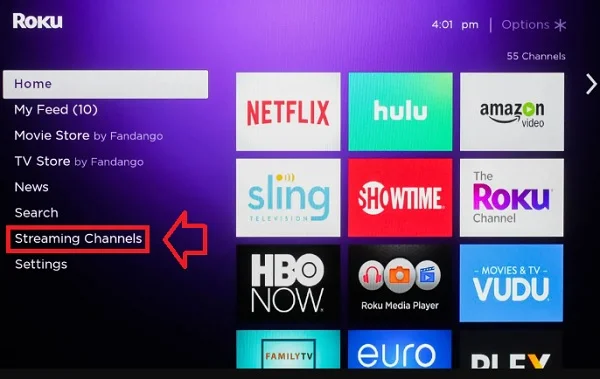
You’ll get a search box to search for different things like actors, TV shows, movies, channels, etc. Here, we have to search for the NFL.
Search with the keyword NFL in the search bar with the on-screen keyboard.
The NFL app will be listed. Click the Add channel button and press OK to install the NFL app on your Roku TV.
That’s it!
Alternate method: Install through the official website
All Roku users should have an official account on Roku where they can log in to and manage their Roku accounts, like adding channels, removing them, etc.
You don’t touch your TV; instead, you can add the NFL on your Roku account with the help of a mobile smartphone or a personal computer.
Open any web browser and then go to the official Roku website.
Or, after logging in to the website, click on this link to get the channel store directly.
In the search bar, search for NFL, and you will get the channel listed. Looks like the image below.
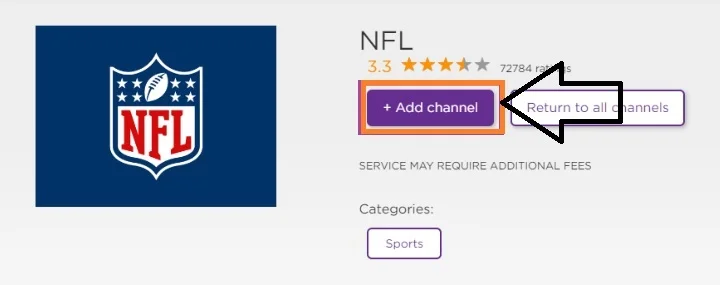
Click on the +Add channel button to add the channel to your Roku TV.
The NFL channel icon will be available on the Home screen. If needed, You can move the channel app icon to the first position so that you can quickly launch it without moving through the numerous icons on the Home screen
How to activate the NFL app on Roku?
You just added the channel. Well!
Now you have to activate it to start streaming your National Football League matches. Activation is a simple process.
Launch the NFL app on your Roku TV.
When it loads completely, the screen will show an activation code, which is a 6-digit numeric code.
Open any web browser on your PC/mobile and go to the website URL at https://www.nfl.com/activate/
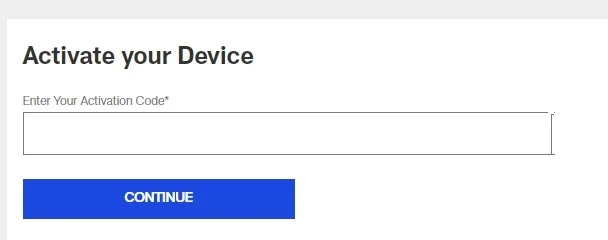
Enter the code displayed on your TV screen into the box provided on your web browser. Click the “CONTINUE” button to activate the channel.
Info:- You must sign up for the NFL website.
Is the NFL app not working on Roku? Here’s the fix
You should buy a premium membership called the NFL+ subscription, which only costs $6.99. You can watch the live football national league matched with your Roku TV.
If the content is not working or there are streaming issues, first of all, check whether the subscription plan has expired.
If loading is an issue, you can fix the Roku TV buffering issues by checking the WiFi network. Regularly update the channel app. By default, Roku itself updates each and every app in the background whenever a new version is released. But you can still check the details from the About section of the application.
Read More:-